




Tailscale
Connect Tailscale as an access review source using an API access token so the platform can list every user of your tailnet and their assigned role.
the platform reads your Tailscale tailnet’s users through the Tailscale API so you can review who has access.
Prerequisites
Section titled “Prerequisites”- the platform organization administrator access
- The Owner, Admin, IT admin, or Network admin role in Tailscale (only these roles can generate an access token)
- A Tailscale account that can read the tailnet’s users, because an access token carries the same permissions as the user who created it
Collected Fields
Section titled “Collected Fields”| the platform field | Tailscale field | Notes |
|---|---|---|
| Name | displayName | Left blank when Tailscale has no display name for the user |
loginName | Tailscale calls it the login name. A user without one is skipped | |
| Role | role | A single role per user: owner, admin, it-admin, network-admin, billing-admin, auditor, or member |
| Admin | role | Flagged as an administrator when role is owner, admin, it-admin, network-admin, or billing-admin |
| Status | status | active and idle are listed as active, suspended as inactive. needs-approval and over-billing-limit leave the status unknown |
| MFA | Not supported | |
| Last login | lastSeen | The later of the last time one of the user’s devices connected and the last time the user authenticated to a Tailscale service |
| External ID | id | Stable identifier used to track the account across reviews |
| Created at | created | When the user joined the tailnet |
Tailscale delegates sign-in to the identity provider or passkey each user authenticates with, and its users API returns no MFA field.
Step 1: Create an API Access Token
Section titled “Step 1: Create an API Access Token”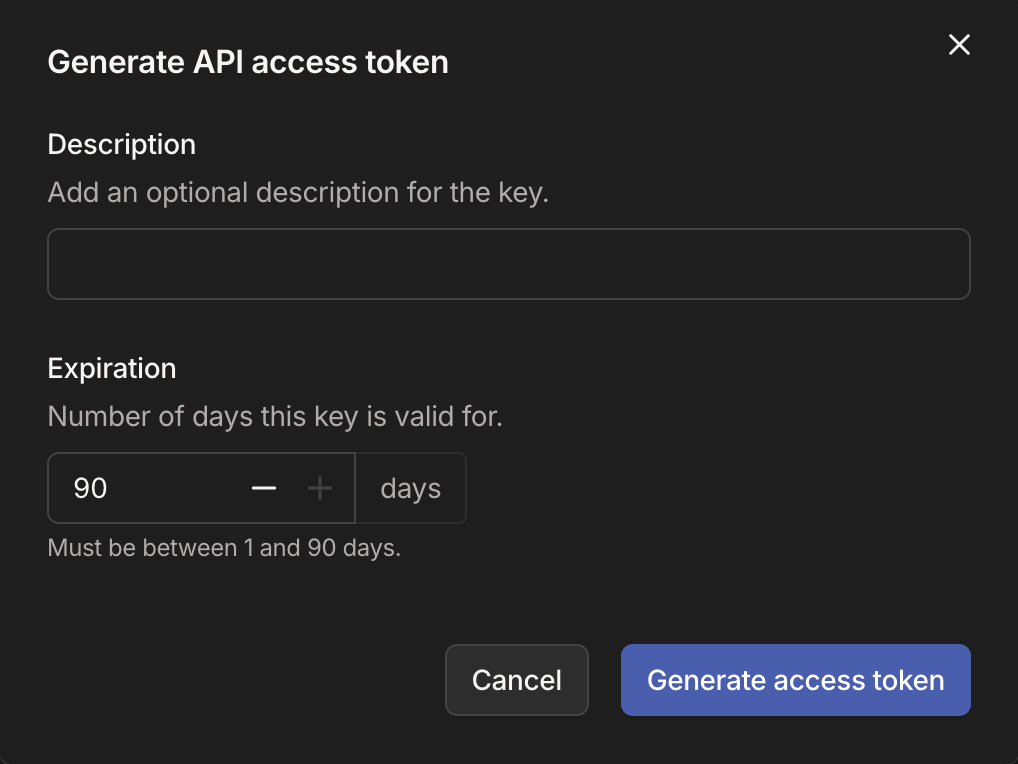
- In the Tailscale admin console, signed in as an Owner, Admin, IT admin, or Network admin, open the Keys page and go to the API access tokens section.
- Select Generate access token, add a Description (e.g.
Probo Access Review), and set the Expiration. Tailscale allows between 1 and 90 days. - Copy the token (
tskey-api-…) and store it securely. Tailscale displays a secret in full only once.
Step 2: Connect in the platform
Section titled “Step 2: Connect in the platform”- In the platform, go to Access Reviews > Sources > Add Source.
- Find Tailscale, click API Key, paste the access token, and click Connect.
the platform names the source after the most common login domain among the imported users, then pulls those users into your campaigns. That name is only a the platform label, so it can differ from how Tailscale identifies your tailnet.
Troubleshooting
Section titled “Troubleshooting”- Token rejected. Confirm it is an API access token (
tskey-api-…). Neither an auth key (tskey-auth-…) nor an OAuth client secret (tskey-client-…) authenticates a Tailscale API request. - The source stops syncing after a few weeks. A Tailscale access token expires after the 1 to 90 days chosen when it was generated. Generate a new token and reconnect the source.
- No members appear. An access token has the same permissions as the user who created it, and the users endpoint returns 404 when that user cannot read the tailnet’s users. Generate the token from an Owner, Admin, IT admin, or Network admin account, and confirm that account can still read the tailnet’s users.
- A user shared in from another tailnet is missing. The users endpoint returns tailnet members by default, so the platform does not import users shared in from elsewhere.